


Cardboard
Google LLC
When I tried Cardboard, I found a very specific kind of app: it is less a complete entertainment platform and more a doorway into smartphone-based virtual reality. That distinction matters. It can make a compatible phone feel surprisingly different when placed inside a Cardboard-style viewer, but the experience depends heavily on the phone, the viewer, and the VR content you choose afterward.
Google LLC presents it as a free app in the Libraries & Demo category, and that description fits better than calling it a full game or a general-purpose media app. I would recommend it to someone who is curious about simple mobile VR, especially if a viewer is already available at home. I would not recommend installing it expecting a large, self-contained library or the polish of a dedicated headset.
What using Cardboard feels like in a shared home
The most natural household use is a short demonstration. One person sets up the viewer, opens the app, and passes the phone to another family member or friend for a few minutes. It works well as a conversation starter because the appeal is immediate: instead of looking at a normal flat screen, you are trying to understand a split, immersive view through the viewer.
I can imagine using it after dinner with a phone that normally stays on a kitchen counter. The first person checks the setup, the next person tries the experience, and everyone compares what they saw. That makes Cardboard more suitable for occasional shared use than for a long solo session. Its strength is the novelty of turning an ordinary smartphone into a basic VR introduction without asking everyone in the house to learn a complicated system.
There is also a practical advantage to taking turns. A single phone and viewer can be enough for a small group, provided everyone is comfortable sharing the device. The app itself does not turn a household into separate user profiles, and it should not be treated as a private, account-based family hub. The person holding the phone is simply the person using the current session.
Related News

Instagram Is No Longer a Photo App. It Is an Attention Engine

Microsoft Teams Mobile: When Collaboration Becomes Navigation

How the NFL App Adapts to Android and iOS Updates

Temu: Elevate Your Shopping Experience to Billionaire Status

Why Traffic Rider Works Best as a Precision Reflex Game

How Google’s Find Hub Transforms Everyday Searches
That shared-device simplicity is helpful, but it also creates boundaries. Before handing the phone over, I would close unrelated apps, silence interruptions, and check that the screen is clean. A VR viewer places the display close to the eyes, so fingerprints and smudges become much more distracting than they are during ordinary phone use.
Why the first setup deserves patience
The basic idea is easy, but the physical setup can still be fiddly. The phone has to sit correctly in the viewer, the image needs to line up with both eyes, and the controls must be reachable in the way the viewer expects. If the phone shifts slightly, the experience can become uncomfortable even when the app itself is working correctly.
I would set it up before inviting other people to try it. That means checking whether the phone fits securely, testing the viewer’s button or interaction method, and making sure the device is not about to lock its screen. This small preparation makes a bigger difference than repeatedly explaining the concept while someone is already wearing the viewer.
Gallery
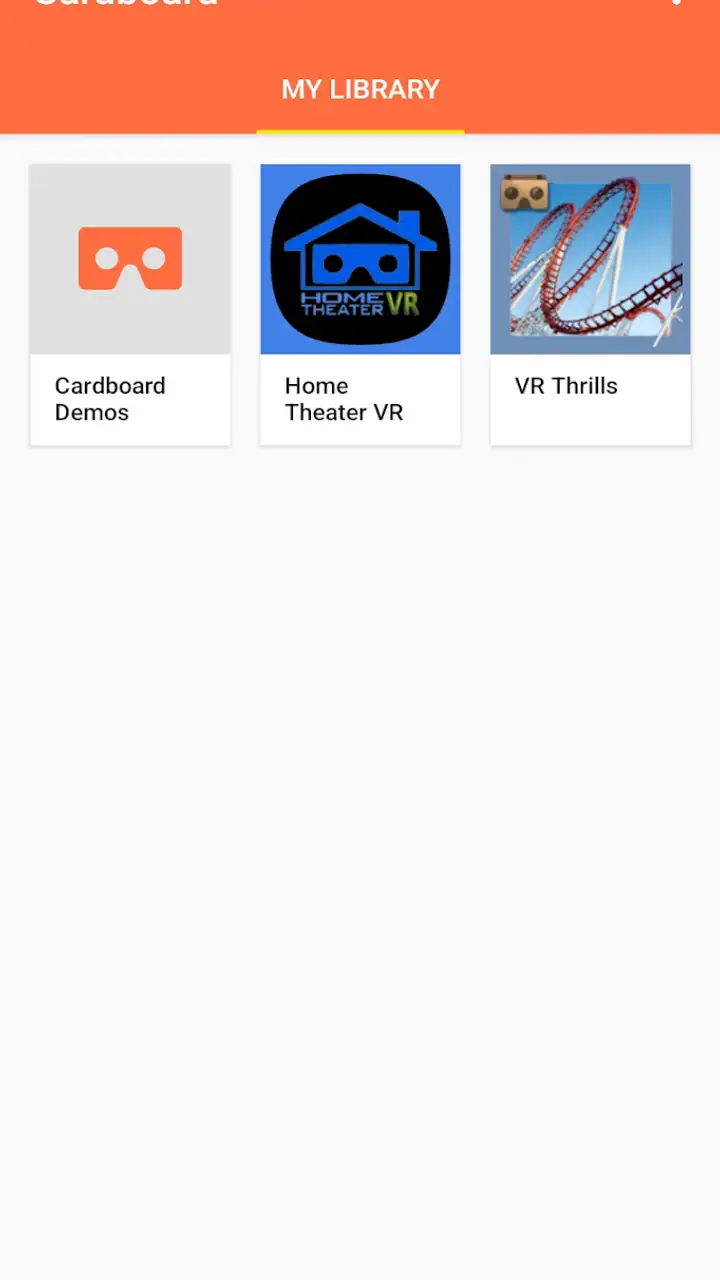
Compatibility is another important boundary. Cardboard is designed for a compatible smartphone, but not every phone gives the same result. Screen quality, sensors, physical size, and the way the device fits the viewer all influence the experience. The minimum operating system is Android 10, so an older phone below that requirement is not a sensible candidate for this app.
That requirement also affects shared households. If the family has several devices, the newest one is not automatically the best choice unless it fits the viewer properly. A smaller or older compatible phone may be easier to mount, while a newer device may offer a clearer display. I would test the actual combination of phone and viewer rather than assuming that the most expensive phone will produce the best result.
Keeping accounts and personal information separate
For a shared phone, I prefer to think of Cardboard as a temporary activity rather than something every person needs to personalize. The safest routine is to use a device that does not expose another person’s private notifications while it is inside the viewer. Incoming messages, calendar reminders, or calls can interrupt the experience and may be visible to whoever is wearing the headset.
This is not a reason to avoid the app; it is a reason to prepare the device. If the phone belongs to a child, an older relative, or a roommate, ask before changing settings or installing additional VR content. If it belongs to someone else, do not assume that sharing the viewer also means sharing the phone’s account, photos, or other apps.
Cardboard does not replace the phone’s normal account boundaries. I would not hand over an unlocked personal phone and assume the viewer makes it private. The practical approach is to keep the session supervised, use only the intended app, and return the device as soon as the demonstration is finished.
This matters especially when several people coordinate a session. One person can handle the phone, another can explain how to place the viewer, and a third can watch for interruptions or discomfort. That division makes the activity smoother and avoids the common problem of someone trying to adjust the viewer while also holding an unfamiliar phone.
Coordinating a better group experience
Short turns work better than an unstructured queue. I would agree in advance on who is trying it first, where the person will sit or stand, and how long each turn should last. Even without inventing a timer or family mode that the app does not provide, simple household coordination prevents the viewer from being passed around carelessly.
Seated use is the sensible starting point. A person looking through a VR viewer has less awareness of the room, so chairs, tables, pets, and other people should be kept out of the immediate path. Someone who is not wearing the viewer should stay nearby and guide the user if the phone or headset needs adjusting.
Cleaning is part of the shared-device routine too. I would wipe the viewer’s contact area and the phone after each round with a suitable dry or lightly damp cloth, taking care not to get moisture into the device. This is not an app feature, but it is one of the real differences between using Cardboard alone and using it as a household activity.
Another useful habit is to agree on the handoff procedure. The user should remove the viewer before passing it back, and the next person should check the phone’s position rather than forcing it into place. That avoids accidental drops and makes the experience feel organized instead of improvised.
Age, trust, and supervision
The content rating is Everyone, which makes the app approachable for a broad audience. Still, an Everyone rating does not mean every child will enjoy the physical experience in the same way. Some people may feel dizzy, tired, or uncomfortable when looking through a VR viewer, even during a brief session.
For younger users, I would begin with a short supervised turn and ask how they feel afterward. If they report eye strain, nausea, headache, or confusion, I would stop rather than encouraging them to continue. The same advice applies to adults who are new to VR. A simple demonstration should remain optional, not a test of endurance.
Trust is also about knowing what the phone is showing. Before a shared session, I would open the app myself and confirm that the intended screen is visible. That is particularly useful when a child is using a parent’s phone or when several people are unfamiliar with mobile VR. The adult supervising does not need to understand every technical detail, but should know how to end the session and remove the phone safely.
I would also avoid presenting the viewer as a replacement for ordinary play, reading, or outdoor activity. Cardboard is best treated as a small technology demonstration. Its appeal comes from a few minutes of discovery, not from keeping someone immersed for a long period.
Where Cardboard is genuinely useful
The app is at its best when the goal is to understand what smartphone VR is like with minimal commitment. A curious first-time user can explore the basic concept without purchasing a dedicated headset. A teacher, presenter, or hobbyist can use it as a simple introduction before deciding whether more advanced hardware is worthwhile.
It can also be useful when a household already owns a compatible viewer that has been sitting unused. In that situation, Cardboard gives the viewer a clear starting point instead of leaving the owner to guess which app to open. The low cost helps here: the app is free, so the main decision is whether the phone and physical viewer are suitable.
Its limitations become clearer when compared with usual alternatives. A normal video app is easier to use, more comfortable for long viewing, and better for passing a phone around without physical setup. A dedicated VR headset usually offers more consistent tracking, stronger controls, and a more developed software environment, although it also requires more equipment and commitment. Cardboard sits between those options: more immersive than a flat phone screen, but much simpler and less capable than dedicated VR hardware.
That middle position is not a weakness by itself. It is exactly why I see value in the app for beginners. The trade-off is that the experience can feel basic once the first novelty fades. Someone already familiar with modern VR may find it too limited, while someone who wants ordinary mobile entertainment may find the viewer inconvenient.
Small details that improve the experience
My first practical tip is to treat phone placement as part of the software setup. If the image looks doubled, tilted, or difficult to focus on, I would stop and reposition the phone instead of trying to tolerate it. A few seconds of adjustment can make the difference between an interesting demonstration and an uncomfortable one.
Second, I would choose the environment carefully. A quiet room with enough space is better than a busy living room where people are walking behind the user. Lowering the chance of interruption also helps the user concentrate on the visual effect without worrying about bumping into furniture.
Third, I would keep expectations modest when introducing it to someone else. Saying “this is a simple look at mobile VR” is more accurate than promising a complete virtual world. That framing prevents disappointment and makes the app’s straightforward nature feel intentional.
Fourth, I would avoid making the phone unavailable for too long if it is the household’s main communication device. A shared demonstration can be interrupted by a call or message, and that is normal. The app works best when everyone understands that the phone remains a phone first and a VR screen second.
Finally, I would revisit the app only when there is a reason to do so: showing it to a new person, testing a different compatible phone, or introducing someone to the idea of smartphone VR. It does not need to become a daily habit to be worthwhile.
Performance expectations and everyday friction
The published version is 4.0, and the app has been available since June 25, 2014. That long presence helps explain its role: it belongs to the earlier, accessible wave of mobile VR rather than the current generation of high-end immersive platforms. I would approach it as a stable starting point for the Cardboard concept, not as a modern headset operating system.
The average rating is 3.5 from around 163 thousand ratings, with roughly 5.1 thousand written reviews. I read that as a sign that the idea attracts plenty of interest but does not remove the practical frustrations of phone-based VR. The rating is useful context, but my own decision would depend more on whether I already had a compatible viewer and a clear reason to try it.
It has passed the ten-million-install mark, which shows that the concept has reached a large audience. That popularity does not guarantee that every phone, viewer, or household setup will feel equally smooth. Mobile VR is unusually dependent on the physical combination of parts, so expectations should remain realistic.
The app’s free price lowers the risk of experimenting. If the viewer is already available, trying it costs little beyond setup time. If the experience is uncomfortable or the phone does not fit well, the main loss is inconvenience rather than a subscription or purchase. That makes it easier to recommend as a trial, even though I would be more selective about recommending it as a long-term platform.
Who should use it and who should skip it
I think Cardboard is a good match for curious beginners, households that enjoy trying simple technology together, and people who want to see whether smartphone VR interests them before buying dedicated equipment. It is also appropriate for someone who values a short, shareable demonstration more than a deep catalog of experiences.
I would be cautious about recommending it to anyone seeking precise interaction, extended sessions, or the smoothness of current standalone VR. It is not the right choice if the household expects separate profiles, private personal spaces, or built-in coordination tools for multiple users. The app can support a shared activity, but the people in the room must provide the organization themselves.
I would also skip it for a phone that is too old for the operating-system requirement, does not fit the viewer, or is too important to keep occupied. In those cases, a normal mobile app may be more practical, and a dedicated headset may be the better direction for someone who already knows they want serious VR.
My household verdict
After using Cardboard, I see it as a friendly introduction rather than a complete destination. Its strongest moment is the first successful demonstration: the phone is placed in the viewer, the user looks through it, and a familiar device suddenly feels unfamiliar. That can be enough to make the app worthwhile, especially when several people want to try it together.
The experience works best with a little preparation. Keep the phone’s personal information in mind, supervise younger or inexperienced users, use a clear area, take turns, and stop immediately if someone feels uncomfortable. Those habits are not optional extras in a shared household; they are what make the simple app pleasant instead of awkward.
Google LLC keeps the barrier low with a free app aimed at Everyone, and that is why I would still suggest trying it when the right phone and viewer are already on hand. I would not buy equipment solely on the assumption that the app will deliver a full VR ecosystem. Cardboard is most convincing as a low-pressure first step into mobile VR: easy to share, inexpensive to test, and honest about its limits when you use it for short, supervised experiences.
FAQs for Cardboard
What is Cardboard and how does it work?
Cardboard is a virtual reality (VR) platform developed by Google that allows users to experience VR content using a simple viewer made primarily of cardboard. By placing a smartphone inside the viewer and using compatible apps, users can explore immersive 360-degree environments. The viewer uses lenses to enhance the VR experience by splitting the smartphone screen into two images.
Which devices are compatible with Cardboard?
Cardboard is designed to work with most Android and iOS smartphones. However, it's important to ensure your device has a gyroscope and an accelerometer for optimal VR functionality. Additionally, the phone should fit snugly into the viewer, which typically accommodates screens up to 6 inches. Compatibility with specific apps may vary, so checking app requirements is advisable.
Are there any safety precautions to consider when using Cardboard?
Yes, users should be mindful of their surroundings while using Cardboard, as it can obstruct peripheral vision. It's recommended to use Cardboard while seated to avoid disorientation or accidents. People prone to motion sickness may experience discomfort, so taking breaks is advisable. Children should use the device under adult supervision to ensure safety.
What types of content can I explore with Cardboard?
Cardboard offers a wide range of VR experiences, from educational tours and immersive games to virtual museum visits and panoramic videos. Many apps are available on Google Play and the App Store, catering to various interests. Users can also view 3D photos and videos, offering a diverse selection of engaging content.
How can I optimize my Cardboard experience?
To optimize your Cardboard experience, ensure your smartphone's sensors are calibrated correctly, and always use a high-resolution display for clearer visuals. Keep your phone's battery charged and close background apps to enhance performance. Regularly clean the viewer's lenses and your phone’s screen for optimum clarity. Lastly, explore various apps to make the most of your VR experience.
Pros
- Immersive VR experience with minimal setup.
- Compatible with a wide range of devices.
- Affordable entry into virtual reality.
- Easy to use with a simple interface.
- Lightweight and portable design.
Cons
- Limited app selection compared to competitors.
- Some devices may experience compatibility issues.
- Requires a smartphone with a gyroscope.
- Cardboard may wear out with frequent use.
- Graphics quality depends on the phone used.


